
In Altegio, the HR Report tool helps you easily manage and analyze employee data with precision. Whether you’re tracking new hires, reviewing employment periods, or checking dismissal records, this report gives you the insights you need to make smart HR decisions.
Main metrics #
- Track new hires over a specific period
- Analyze team retention by comparing creation and employment dates
- Filter dismissed team members for auditing or documentation
- Segment team by services they provide or their job roles
Where to find the report #
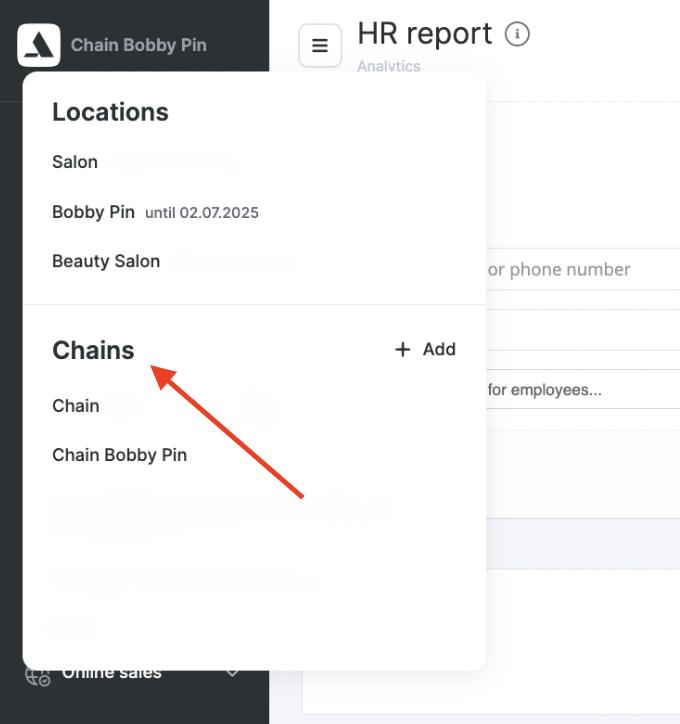
- Go to Chain interface. Select the desired chain from the left drop-down menu.
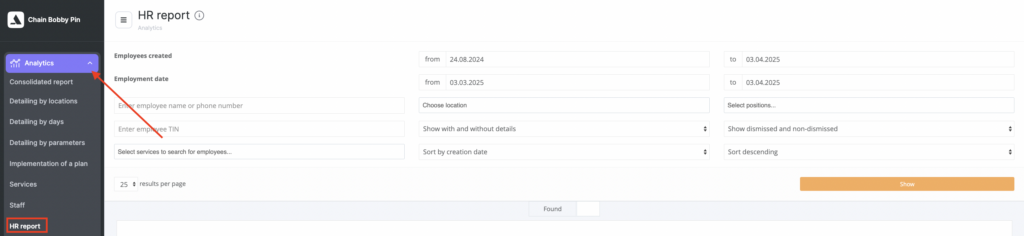
- Go to Analytics > HR report from the side menu to get started.
Filtering options #
- Team member creation date — filter by the date the team member was added to the system.
- Hire date — select a period based on the team member’s actual start date.
Team member search #
- Name or phone number — search by full name or phone number
- Team member tax ID (INN) — filter by INN
- Location — select one or multiple branches
- Position — filter by job position
- Services — find team members who provide specific services
Data display #
- With details / without details — choose whether to show the team member’s details (requisites)
- Dismissed / not dismissed — filter by dismissal status
Viewing the report #
Once filters are set, click the “Show” button to view the report. The results will appear in the table below.