
An acquiring fee is the fee a bank or payment service charges when a client pays for services by card. In Altegio, you can choose whether to include or ignore this fee when calculating team member’s compensation. To do this:
- Go to Payroll > General settings.
- In the Accounting for acquiring fees section, configure who covers the acquiring fee when an appointment is paid and how it is distributed in team member payroll calculations.
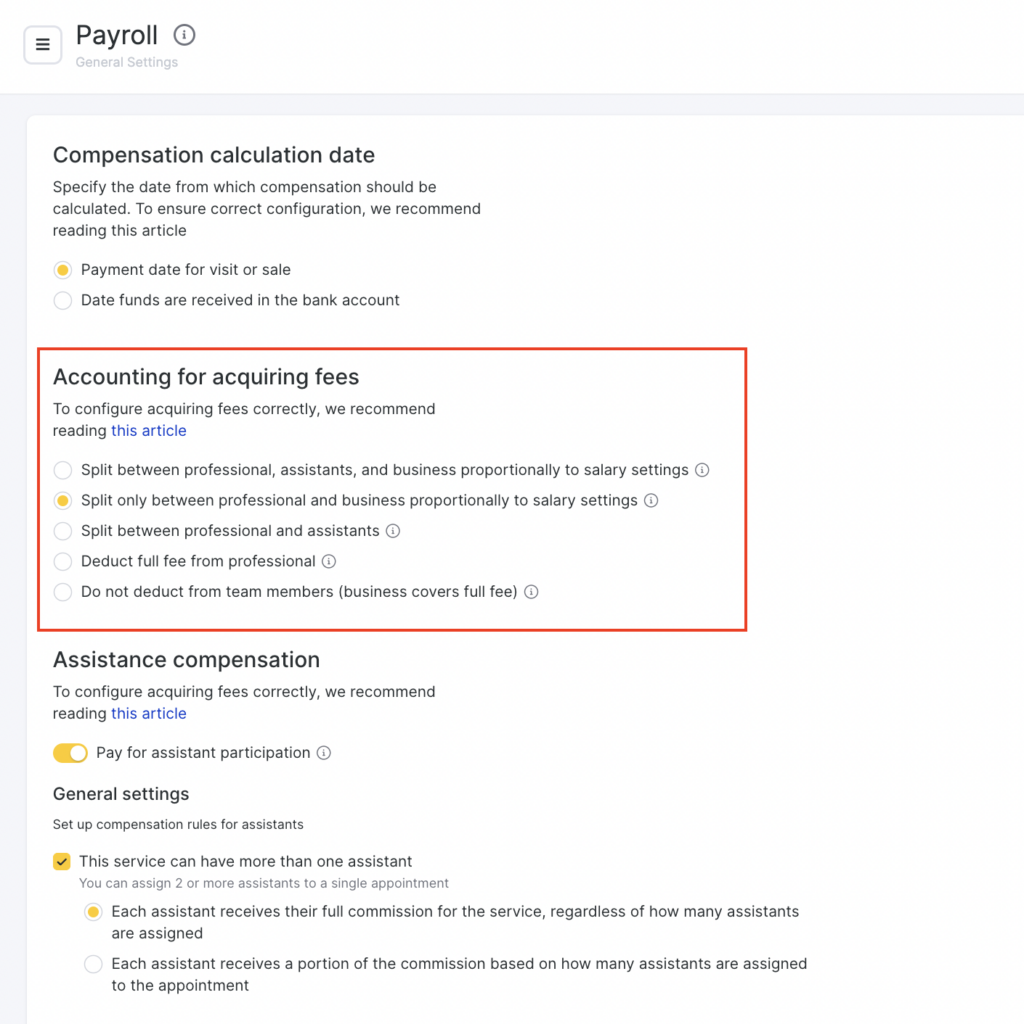
There are 5 options available:
- The fee is split between the professional, assistants, and the business according to payroll settings
The acquiring fee is distributed among all appointment participants — the main specialist, assistants, and the business — in the same proportions set in payroll settings.
Example
The acquiring fee is $10. According to payroll settings, the specialist covers 40% of the fee and the assistant covers 10%. In this case, $4 is deducted from the specialist’s pay, $1 from the assistant’s pay, and the remaining $5 is paid by the business.
- The fee is split only between the professional and the business according to payroll settings
The fee is distributed between the specialist and the business according to payroll settings. Assistants do not participate in the fee distribution — their payroll is calculated without taking the acquiring fee into account.
Example
Fee: $10. Specialist covers 60%, assistant covers 20%.
Result: $6 is deducted from the specialist’s pay, $0 from the assistant’s pay, and $4 is paid by the business.
- The fee is split between the professional and assistants
The fee is fully distributed among professionals participating in the appointment — the specialist and assistants. The business does not pay the fee.
Example
Fee: $10. Specialist 40%, assistant 10% → $4 is deducted from the specialist’s pay, $1 from the assistant’s pay, and $5 is paid by the business.
If there are multiple assistants, their share is distributed among them proportionally according to payroll settings.
- The specialist pays the full fee
The entire acquiring fee is deducted from the main specialist’s pay. Assistants and the business do not pay the fee.
Example
Fee: $10. $10 is deducted from the specialist’s pay.
The assistant and the business do not pay the fee.
- The fee is not deducted from team member pay (the business pays)
The acquiring fee does not affect professional payroll and is fully paid by the business.
Example
Fee: $10. No deductions are made from professional’s pay. The business pays $10.
If fees haven’t been configured yet, you can go to the configuration by clicking Set up, or by selecting Finance > Payment methods and fees from the menu. More details on setting up fees are provided in this article.
- After making changes, click Save in the bottom-right corner.