
Overview #
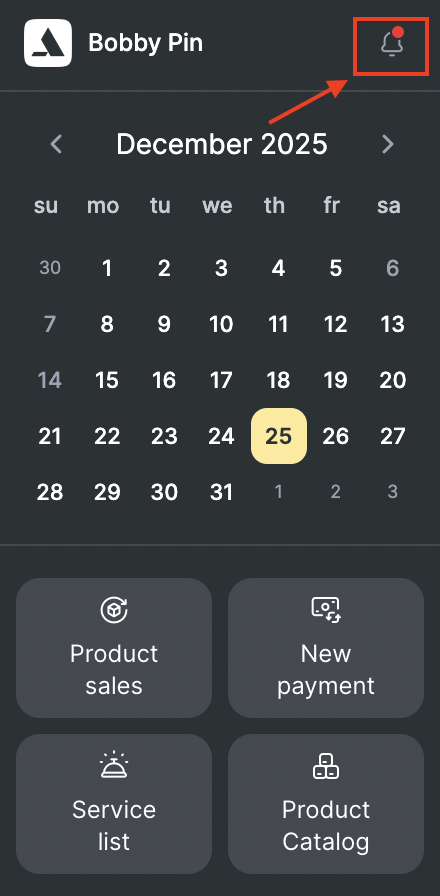
The Notification Center in Altegio is a centralized section that stores all notifications intended for the user. This feature ensures that users can easily access and manage their notifications without missing important updates. The Notification Center is located to the right of the location name in the location interface.
Accessing the Notification Center #
Location: The Notification Center is situated to the right of the location name in the Altegio interface.
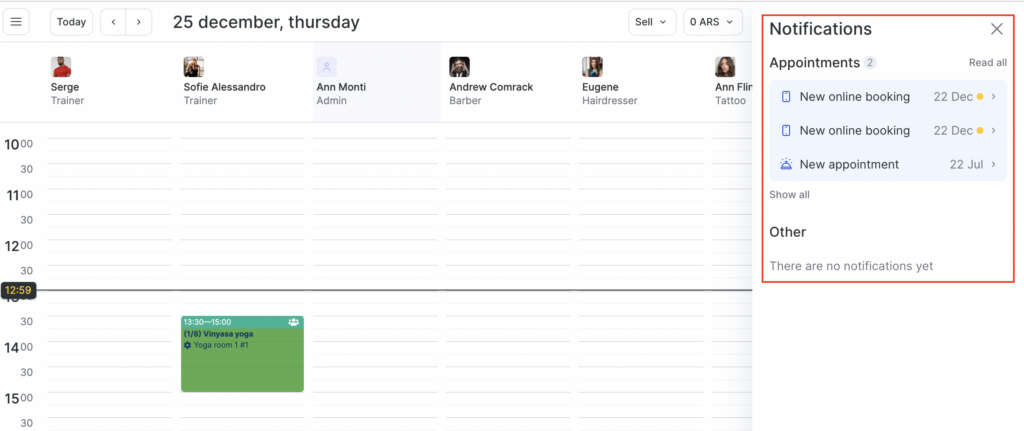
Notification types: All types of enabled notifications for the user are saved in the Notification Center when they are sent.
Notification types #
The Notification Center includes various types of notifications to keep the user informed about different activities within Altegio. The key notifications include:
- Appointments
- All: Notifications of all types.
- New: Notifications about newly created appointments.
- Deleted: Notifications about deleted appointments.
- Paid via QR code: Notifications about appointments paid via QR code.
- Rescheduled: Notifications about rescheduled appointments.

Note
Appointment notifications are clickable and will redirect users to the appointment details for more information.
- Calls
Notifications about incoming calls to ensure users don’t miss any important communications.
- Data Uploads via Excel
Successful uploads: Notifications confirming successful data uploads.
Unsuccessful uploads: Notifications indicating any issues or failures during the data upload process.
Using the Notification Center #
Users can click on appointment notifications to be redirected to the detailed view of the appointment.
The Notification Center allows users to keep track of all notifications in one place, making it easier to manage and respond to various activities and updates within Altegio.
The Notification Center in Altegio is an essential tool for users to stay informed about appointments, incoming calls, and data upload statuses. By centralizing all notifications, it ensures that users can efficiently manage their tasks and keep track of important updates, enhancing overall productivity and user experience.