Promoting goods and services via SMS campaigns is an effective marketing tactic that helps retain existing clients and attract new ones. However, it’s important to understand that this type of advertising is regulated by the laws of the country where you operate.
Full responsibility for unlawful SMS sending lies with the initiator of the advertising — the business owner using Altegio for SMS notifications.
What the SMS advertising law generally requires #
- Campaigns must not contain falsified information. Advertising must be truthful and fair.
- The party distributing advertising messages must immediately stop the campaign upon the first request from the executive authorities of your country.
- A company that stores client data must also have the client’s permission to store and use that data. The client has the right to request deletion of all information. How to obtain client consent is explained below.
What is directly prohibited by law? #
Legislation prohibits advertising narcotic and psychotropic substances, alcohol, cigarettes and other tobacco products. The advertiser is also not allowed to promote adult products and escort services, 18+ websites, dietary supplements, medicines, gambling, forged documents, or weapons through these channels. Promotion of violence is also prohibited.
Campaigns may be sent only with the subscriber’s prior consent.
Violations #
If advertising messages are sent without the subscriber’s consent, the campaign initiator may face a fine.
A substantial fine may also apply if the content of the campaign violates the law.
How to get consent from a client #
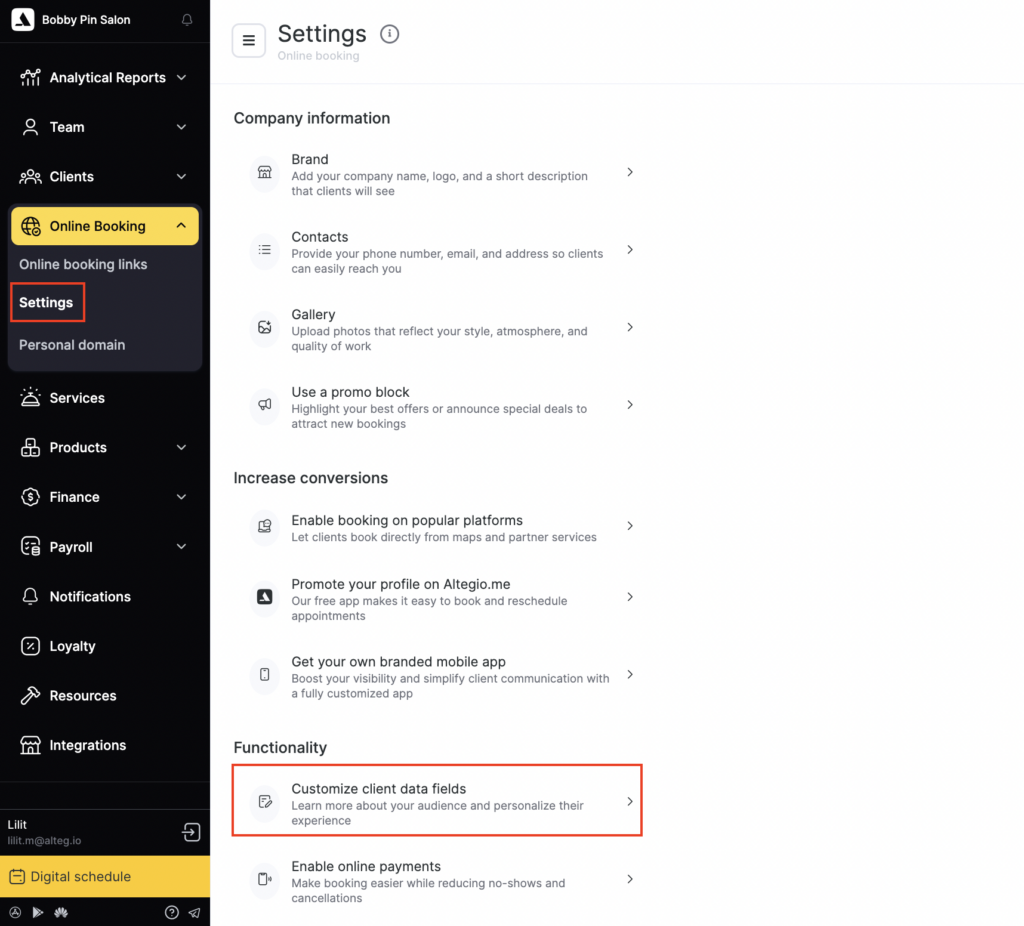
When booking online, any user agrees to the Terms of Use and Privacy Policy. To set up the consent wording, go to:
Online booking > Settings > Customize client data fields > Data entry confirmation.
or Edit client data entry screen > Personal data processing tab.
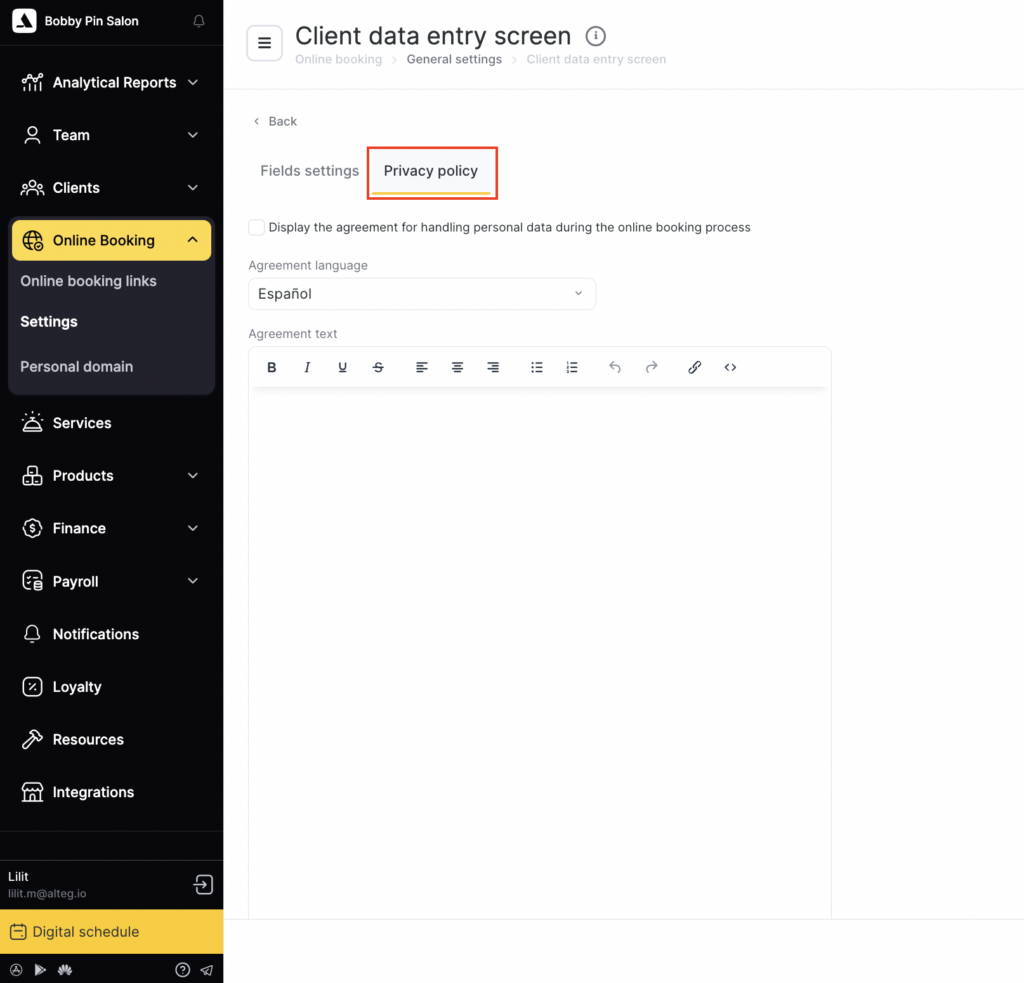
According to the user agreement, the user gives consent, including consent to receive SMS notifications:
7.1.1. By providing their phone number when making an online booking on the Website, the User agrees to its processing by the Website Administration, including for the purpose of fulfilling obligations to the User under this User Agreement, informing the User about its services, promoting the services of the Website and its partners, conducting electronic and SMS surveys, monitoring marketing campaigns, providing customer support, holding prize draws among Users, monitoring User satisfaction and service quality, and collecting feedback. Providing information by the Administration to partners, agents, and third parties acting under an agreement or offer agreement with the Administration for the purpose of fulfilling obligations to the User is not considered a violation; partners also have the right to send the User SMS reminders and notifications.
When a client books by phone, there is no such confirmation, so consent must be obtained in writing. The most practical option is to have the client fill out a form. Ideally, this is a standard paper form with a defined set of fields that the client fills in and signs by hand. It’s also recommended that the company employee who received the form signs it as well.
To send marketing SMS messages, you must obtain the client’s prior consent. Consent must be specific, informed, and explicitly expressed (for example, by checking a separate box when booking a service).
Simply providing a phone number does not always mean consent to receive advertising messages unless this is explicitly allowed under the applicable law.
The user must ensure there is an option to unsubscribe from further messages (opt-out) and must store proof that the client’s consent was obtained.
Form examples and rules #
If the required fields are missing from the form, it means the company did not obtain explicit consent to receive marketing SMS messages. A person giving consent to SMS campaigns should provide in the form:
- Last name
- First name
- Middle name
- Phone number
It’s also recommended to include an option like “Opt out of SMS notifications” — otherwise regulators may consider SMS notifications as being forced on the client, since they had no alternative.
Even better: offer several categories of information the client can choose to receive, such as “Discounts,” “Sales,” “Company news,” etc.
The subscriber should be warned about the consequences of providing incorrect data in the form. For example, if the client enters an incorrect phone number, your SMS messages could be sent to someone who did not give consent. In that case, responsibility is removed from you.
How to exclude a client from SMS campaigns #
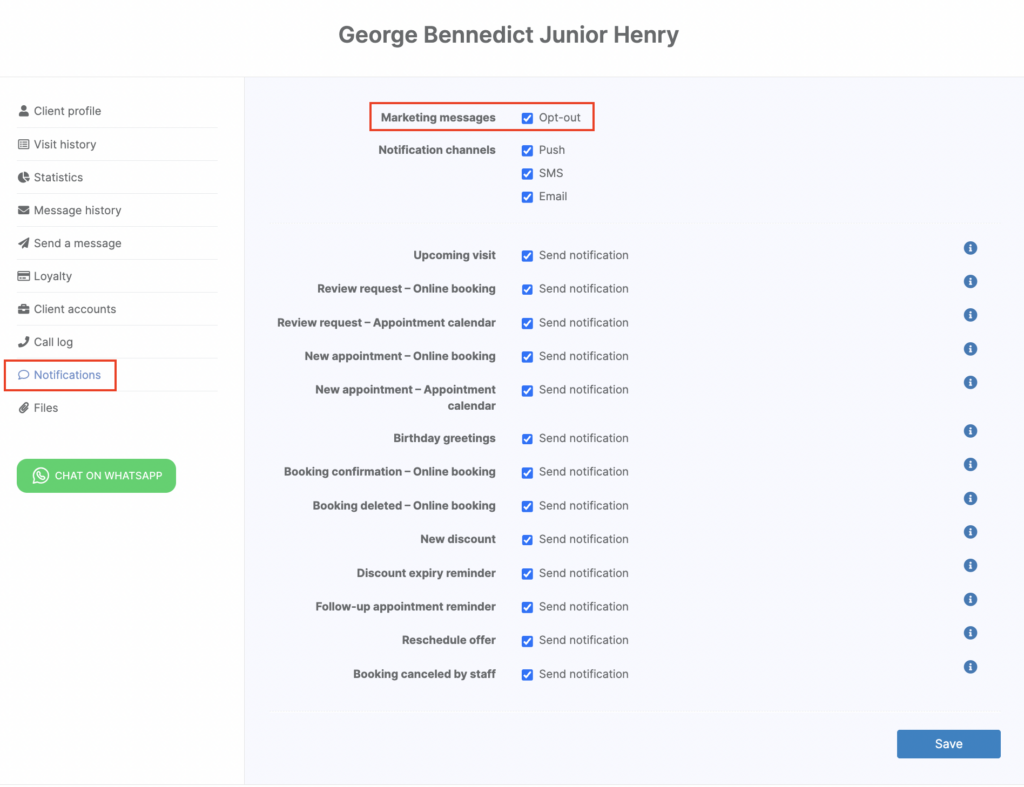
The easiest way to exclude a client from marketing SMS campaigns is to enable the relevant setting in their client profile in Clients > All Clients
- Select the client and open their profile.
- Go to Notifications.
- Check Exclude under Marketing campaigns.
- Save changes.
Altegio provides a technical tool for sending campaigns. The user of the service is responsible for complying with advertising and personal data laws, including obtaining the required consents and processing clients’ personal data lawfully.