
In the Marketplace, you can publish your pricing plan grid. This helps users make decisions faster when choosing a service and compare different partners.
Where are plans displayed? #
If an app has a pricing grid configured, a new Plans tab will appear on the app page.
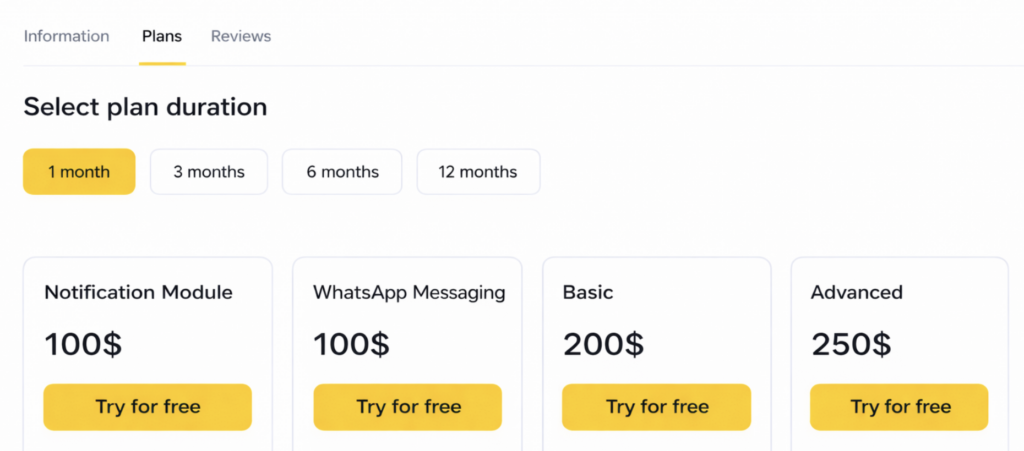
How to add your app’s plans to the Marketplace #
To add your app’s plans, you need to fill out an Excel file with your service’s plan options and include:
- App ID
- Plan duration
- Plan name
- Plan price (the full price for the entire plan period)
- Available options and features included in the plan (there must be no plans with zero options listed). List the options separated by commas.
- Actual plan duration (for example, the plan is 3 months, but you give 1 extra month as a gift. In that case, specify: duration 3 months, actual duration 4 months, and in the plan options you can include “+1 month as a gift”).
- Payment link. Provide a link where the user can go to pay for the plan. This can be a link to your pricing page on your website or a link to the payment form in your service account.
- Currency
An example import file is attached at the end of the article.
Fill out the file following the example and send it to an Altegio representative. After that, your plans will be added to the Marketplace.