
What is a multi-location integration connection? #
This is a modal window that opens when you click on the “Connect” button in the application card. In it, the user can choose and connect the integration in all locations available to him at a time.
Flow connection integration in multiple locations from the user side: #
- The user clicks on the “Connect” button in the application card.
- A modal window appears with a choice of locations available to him (available — those in which he can connect the integration, that is, in those where he has the right “Manage user rights”). If only one location is available to him, the modal window with the choice of locations will not appear. If this integration is already enabled in some locations, they will not be available for selection.
- The user selects either specific locations, or clicks the checkbox “Select all locations”. There is also a function to search for a locations by name.
- User clicks on the “Next” button and goes to the rights agreement screen. Clicks on the “Continue” button.
- The user goes to the integrator’s website and registers.
- In all selected locations, the integration changes to the “Connected” status.
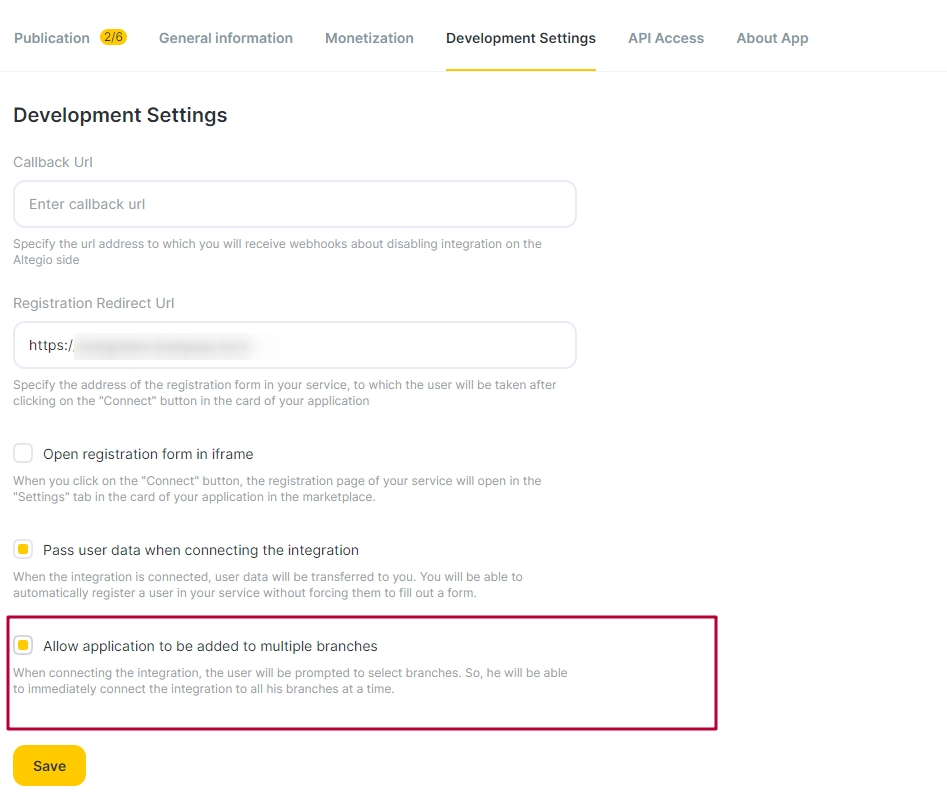
In order to set up an integration connection in your application in several locations, you need to: #
- Go to the Developer’s Personal Account.
- Go to the application in the tab “Settings for development”.
- Mark the checkbox “Allow to add the application to several locations”.
- Save changes.
What else is important to know: #
- If the user has selected several locations, when registering, your service will receive not one locations ID, as before, but an array of locations IDs of the form ?salon_ids[]=YYY&salon_ids[]=XXX. The request to activate the integration must be sent to all received locations in the array, otherwise the integration will not be activated, and you, for your part, will not get access to the locations API and will not be able to add your webhooks to these locations.
- If two settings are selected at the same time — registration via iframe and connection in several locations — an array of IDs will also be transferred to the iframe when selecting several locations (you can read about registration through iframe in this article).
- If two settings are selected at the same time — data transfer and connection in several locations — as before, user_data + an array of IDs of the selected locations will be transferred to your service (you can read about data transfer in this article).